GitHub Actions Demo Test Execution
Continuous integration and delivery (CI/CD) has seen some radical changes during the past few years. It ensures delivering the product well and often with the help of automated builds, testing, and deployment. Being automation testers, we must know how to configure CI/CD pipelines as it provides the facility to test more frequently without burdening developers or operators with more manual work.

In this blog, I have explained one very famous CI/CD platform (i.e GitHub actions). There are CI/CD tools like Jenkins available in the market which are used by automation testers but these days, most people are using GitHub for version control and **collaboration.**So, GitHub actions is becoming the favorite choice for automation testers/developers for CI/CD.
Below are the topics which will be covered as part of the blog:
What is GitHub action
What are the components of GitHub action
How to set up GitHub Action in the GitHub repository
How to view GitHub Actions activity
What is GitHub Actions:
GitHub Actions is a continuous integration (build, test, merge) and continuous delivery(automatically release to the repository) (CI/CD) platform. It automates and executes the software development workflows right from GitHub. It helps to customize how actions work and automate tasks all along in the software development lifecycle. With GitHub Actions, we can build, test, and publish across multiple platforms, operating systems, and languages all within the same workflow and then see the status checks displayed within the pull request.
GitHub Actions support many languages and frameworks, and they are also written in YAML. Therefore, these can be edited, reused, shared, and forked just like code. There is a very good range of pre-defined templates,available on github marketplace which may save you an ample amount of time and avoid rewriting already available code.GitHub Actions are event-driven. It can run a series of commands after a specified event has occurred.
One example of GitHub Actions is :
Let’s say, you have configured Github Action in your git repository and you push your code to the remote branch .So, whenever any events happen in your repository, Github Action will automatically trigger the workflow.
Github Actions can be configured on any events like opening pull request, merging code , pushing to the branch.Github Action is event driven . So, whenever any event happens (Like someone creates a pull request, pushed a code to the github repository), github actions would be called.


GithubActions uses .yml syntax to define the events, jobs and steps.
Components Of GitHub Actions:
Components of GitHub Actions include workflows, events, actions.These components enable the creation of powerful automation pipelines for building, testing, and deploying projects on GitHub.
Below is the detailed explanation about the components of GitHub Actions:
a. Events :
Events is activity which trigger workflow to run. Events can be be triggered on opening a pull request , merging a pull request etc. It can be configured to run on schedule.
b. Workflows (Jobs, Runner, Steps) :
Job is a set of steps in a workflow that execute on the same runner
Runner is a server that runs your workflows when they’re triggered. Each runner can run a single job at a time.
Steps means actions to perform/control the order in which actions are run
c. Actions:
It is custom application/commands for the GitHub Actions platform that performs a complex but frequently repeated task which automate the workflow process.
How to set up github action in Github repository:
**Pre-Requisite :**One needs to have Github repository, to create and run a github Actions workflow. Github Actions uses YAML syntax to define the workflow.
In the below section, I have explained how one can add Github Action to the Github repository.I have taken an example of my Github repository which already has some code pushed in to master branch. In Github repository, one needs to create .github/workflows/directory and add .yml file.
There are two ways to create a *.yml file
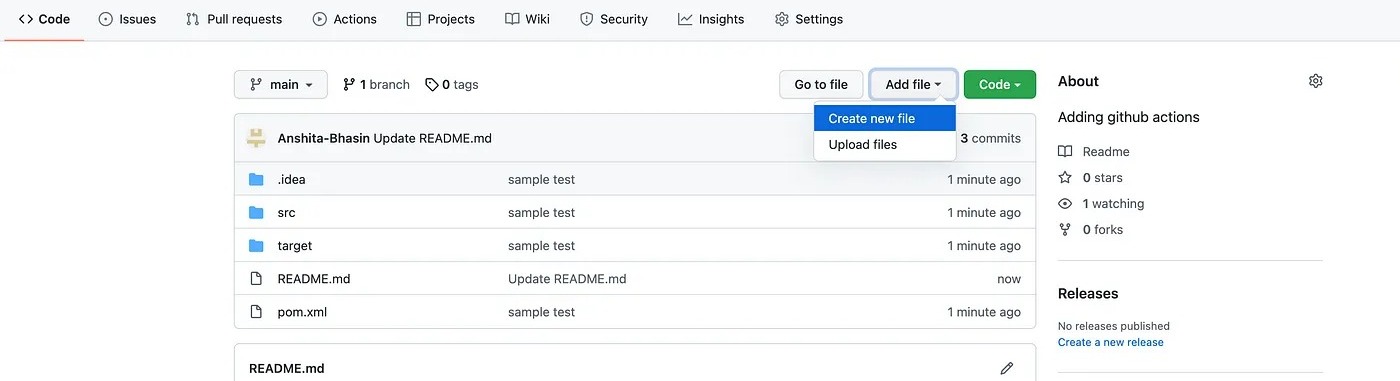
1.Through Web Application (Github) directly
a. Go to repository
b. Click on Add File > Create New File
2. Through Terminal:
a. Clone your GitHub repository into your system (git clone [Githubrepo])
b. Go to yoc. Enter .github/workflows/main.yml ( It has to be in the same sequence)

d. Now, you can add the code to the main.yml file and commit changes to your Github repository
Sample Code :

ur Githubrepo (cd githubactions). Create a directory .github (command: mkdir .github)
*githubactions is the repository name used here
c. Go to .github (cd .github)
d. Create a directory workflow (command: mkdir workflows)
e. Go to workflows (cd workflows)
f. Create *.yml file (command: vi main.yml). You can give any name. I have created a file as main.yml
# This workflow will build a Java project with Maven and cache/restore any dependencies to improve the workflow execution time
name: GitHub Actions Demo Test Execution

on:
 push:
 branches: [ master ]
 pull_request:
 branches: [ master ]
 schedule:
 - cron: '*/15  '

jobs:
 build:

 runs-on: ubuntu-latest

 steps:
 - uses: actions/checkout@v2
 - name: Set up JDK 11
 uses: actions/setup-java@v2
 with:
 java-version: '11'
 distribution: 'adopt'
 cache: maven
 - name: Build with Maven
 run: mvn clean install
How to view GitHub action activity:
Once the GitHub actions are configured and start running, you can view each step’s activity on GitHub.
Go to your repository on Github.com
Under the repository name, click on Actions tab

3. Select the workflow you want to see from the left sidebar.
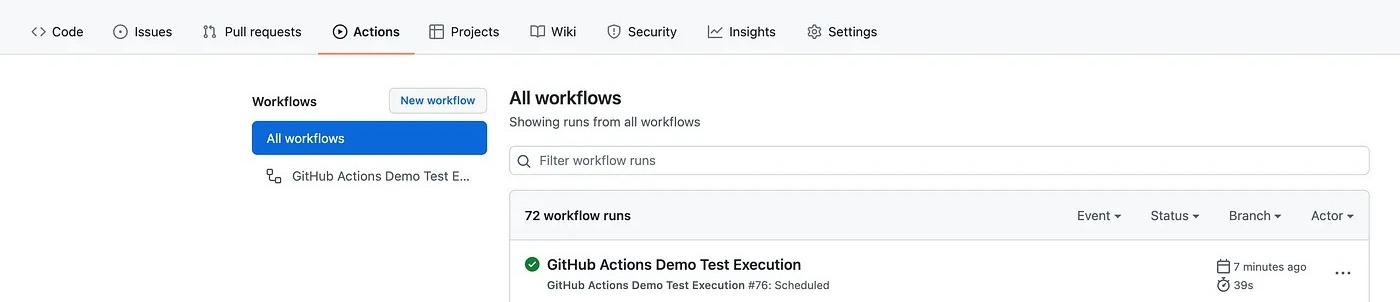
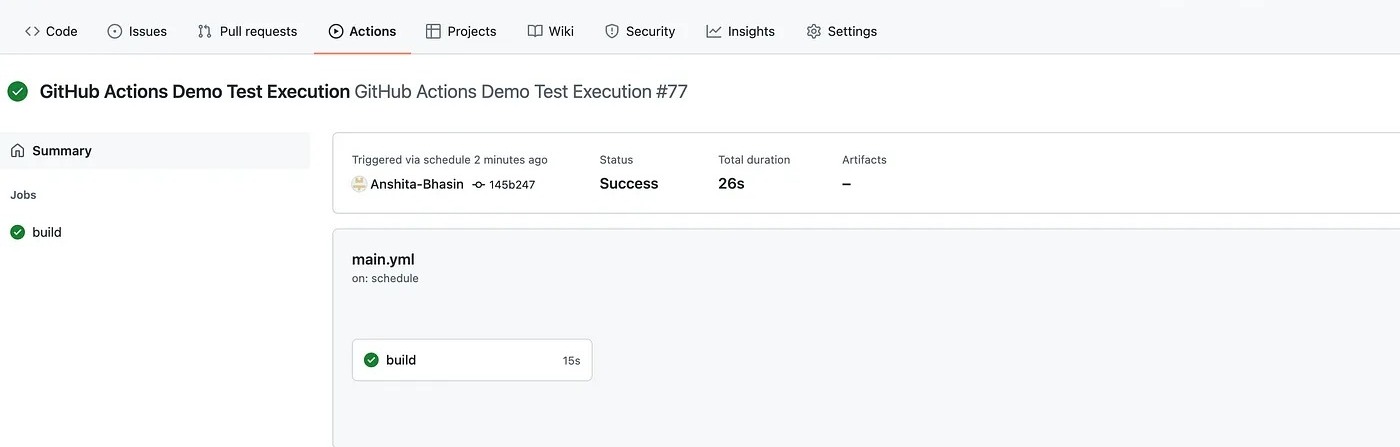
4. Under “Workflow runs”, click the name of the run you want to see.

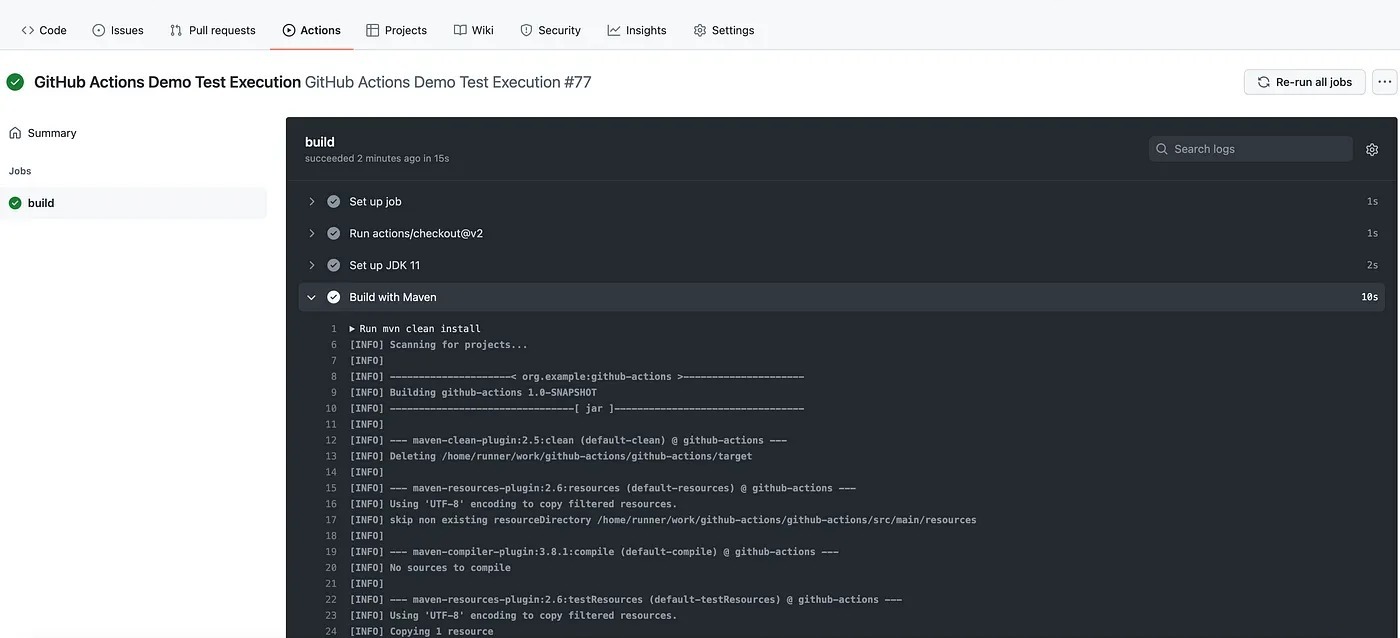
5. One can view the result of each step by clicking on the workflow

Summary
So by now, you should be able to understand, how to configure GitHub actions in your git repository. In the next article in this series, I will provide detailed examples of different workflows like Slack configuration, workflow scheduling, and many more.
I hope you have enjoyed the article. Thanks for reading !! Stay tuned!

